GH Script Manager
Blender 3.6 – 5+
Add-on Version: 1.4.0
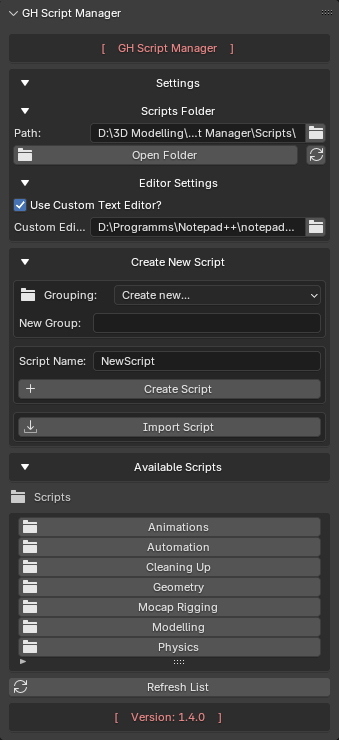
GH Script Manager Interface
Installation
- Download GH Script Manager
- Open Edit → Preferences → Add-ons
- Click Install
- Select the add-on ZIP file
- Enable GH Script Manager
-
Open:
text
N-Panel → GH Tools → GH Script Manager
Compatibility
| Blender Version | Status |
|---|---|
| 3.6 LTS | ✅ Full |
| 4.x | ✅ Full |
| 5.x | ✅ Full |
Info
The add-on is developed using Blender's standard Python API and is designed to remain compatible with future Blender releases whenever possible.
Features
Script Management
- Create Python scripts directly inside Blender
- Organize scripts into groups and folders
- Import existing
.pyfiles - Delete scripts with confirmation dialogs
- Automatic cleanup of empty folders
Script Execution
- Run Python scripts directly from Blender
- Execute scripts without opening the Text Editor
- Fast access to frequently used tools
Script Editing
- Open scripts in a custom editor or default system editor
- Blender Text Editor fallback if no supported editor is available
- Support for external editors
- Automatic editor detection on Windows, Linux, and macOS
Folder Navigation
- Browse script folders directly inside the add-on
- Create nested script groups
- Open the scripts folder in your file manager
Configuration
- Persistent scripts folder path
- Persistent editor settings
- Automatic migration of older configuration files
Typical Workflow
- Create a script group (optional)
- Create or import a Python script
- Select the script from the list
- Edit the script
- Run the script directly from Blender
Documentation
Getting Started
Script Management
Script Execution
Editor Configuration
Links
Documentation License
You may redistribute this documentation unmodified with proper attribution to the original author.
Translations into other languages are allowed, provided the content remains unmodified and proper attribution is preserved.
Other modifications and derivative works are not allowed without explicit permission.