Importing Scripts
The Import Script feature allows you to add existing Python scripts to GH Script Manager.
This is useful when:
- Migrating scripts from another project
- Organizing existing Blender tools
- Sharing scripts between computers
- Building a personal script library
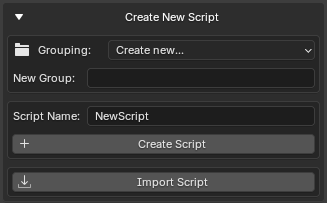
Import Script Dialog
Importing a Script
To import a Python script:
- Open the Create New Script section
- Select a target group (optional)
- Click Import Script
- Choose a
.pyfile - Confirm the import
The selected script will be copied into the configured scripts directory.
Only Python files (.py) are supported.
Import Destination
Imported scripts are copied into the selected script group.
Example:
Group selected:
Utilities
Imported file:
RenameObjects.py
Result:
Scripts
└── Utilities
    └── RenameObjects.py
Importing Into Nested Groups
Scripts can also be imported into nested folders.
Example group:
Tools/Export
Result:
Scripts
└── Tools
    └── Export
        └── ExportFBX.py
Missing folders are created automatically when needed.
Duplicate File Protection
GH Script Manager prevents accidental overwriting.
Example:
Existing file:
RenameObjects.py
Imported file:
RenameObjects.py
Result:
Import Cancelled
The original file remains unchanged.
An error message will be displayed.
Automatic Refresh
After importing a script:
- The script list is refreshed automatically
- New folders become visible immediately
- Imported scripts appear without restarting Blender
No manual reload is required.
Organizing Imported Scripts
A common workflow is to organize scripts by category.
Example structure:
Scripts
├── Utilities
│   ├── RenameObjects.py
│   ├── CleanNames.py
│   └── BatchExport.py
│
├── Animation
│   ├── BakeActions.py
│   └── CurveTools.py
│
└── Pipeline
    ├── FBXExporter.py
    └── AssetValidator.py
This makes navigation easier when working with larger script collections.
Typical Workflow
- Select a group:
Utilities
- Click:
Import Script
- Select:
RenameObjects.py
-
Confirm the import
-
The script appears in the list automatically
-
Select the script and use Run Script or Edit