Main Menu
The GH Script Manager panel can be found in:
3D Viewport → N Panel → GH Tools → GH Script Manager
The add-on provides a centralized environment for managing, editing, organizing, and executing Python scripts directly inside Blender.
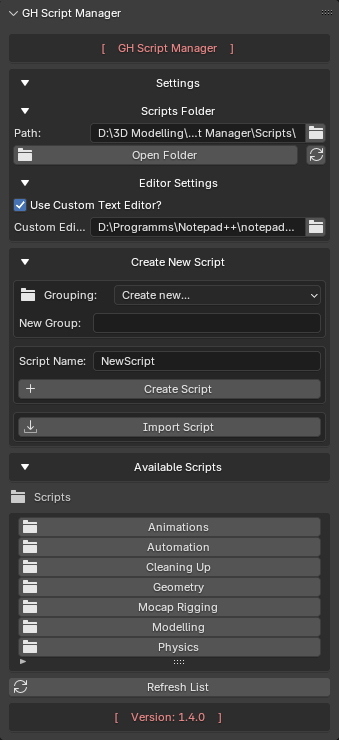
GH Script Manager Main Panel
Interface Overview
The main panel consists of four sections:
- Settings
- Create New Script
- Selected Script
- Available Scripts
Settings
The Settings section contains all configuration options for the add-on.
Available options include:
- Scripts folder selection
- Open scripts folder in file explorer
- Reset scripts folder to default
- External editor configuration
See the dedicated Settings documentation page for detailed information.
Create New Script
This section is used to create or import Python scripts.
Features:
- Create new Python scripts
- Automatically generate
.pyfiles - Create script groups (folders)
- Import existing Python files
Grouping
Scripts can be organized into custom folders.
Examples:
Utilities
Animation
Animation/Rigging
Tools/Export
Groups are created automatically when a new script is added.
Selected Script
When a script is selected from the list, an additional panel becomes available.
Available actions:
Run Script
Executes the selected Python script immediately.
Edit
Opens the script in:
- Custom external editor, if enabled and valid
- Default system text editor
- Blender Text Editor as fallback
Delete
Deletes the selected script.
A confirmation dialog is shown before deletion.
Empty folders created by the add-on may be removed automatically after deleting scripts.
Available Scripts
The Available Scripts section displays all script groups and Python files located inside the configured scripts folder.
Folder Navigation
Features:
- Open folders
- Navigate into subfolders
- Return to parent folder
- Refresh folder contents
Script Selection
Clicking a script selects it for:
- Editing
- Execution
- Deletion
Selected scripts remain active until another script is chosen or the selection is cleared.
Refresh List
The Refresh List button rescans the scripts directory and updates:
- Folders
- Imported scripts
- Newly created scripts
- Deleted scripts
Use this option if files were modified outside Blender.
Version Information
The add-on version is displayed at the bottom of the panel.
Example:
Version: 1.4.0
This information is useful when reporting bugs or requesting support.